One workflow, built end to end on the args.ai engine — from raw uploads to review-ready drafts. Here’s every step.

Flagship showcase

Office Action Response

Analyze a USPTO office action against the application and prior art, build a scored rejection chart, and draft argument/amendment responses with a rendered report.

01 · INTAKE

Intake that knows prosecution.

Seven document roles, auto-classified on upload — and anything ambiguous becomes a question with per-role buttons, not a silent guess.

document intake

I received “Acme_NDA_2026.docx.” It appears to be a nondisclosure agreement rather than a prosecution document, so I need to know how you want it used before incorporating it. Please identify its document type or explain its relevance to the Office Action response.

What kind of document is “Acme_NDA_2026.docx”?
Office action Specification Claims Amendment Draft response Prior art Drawings Remove this document
From the sample matter — illustrative fictional intake.
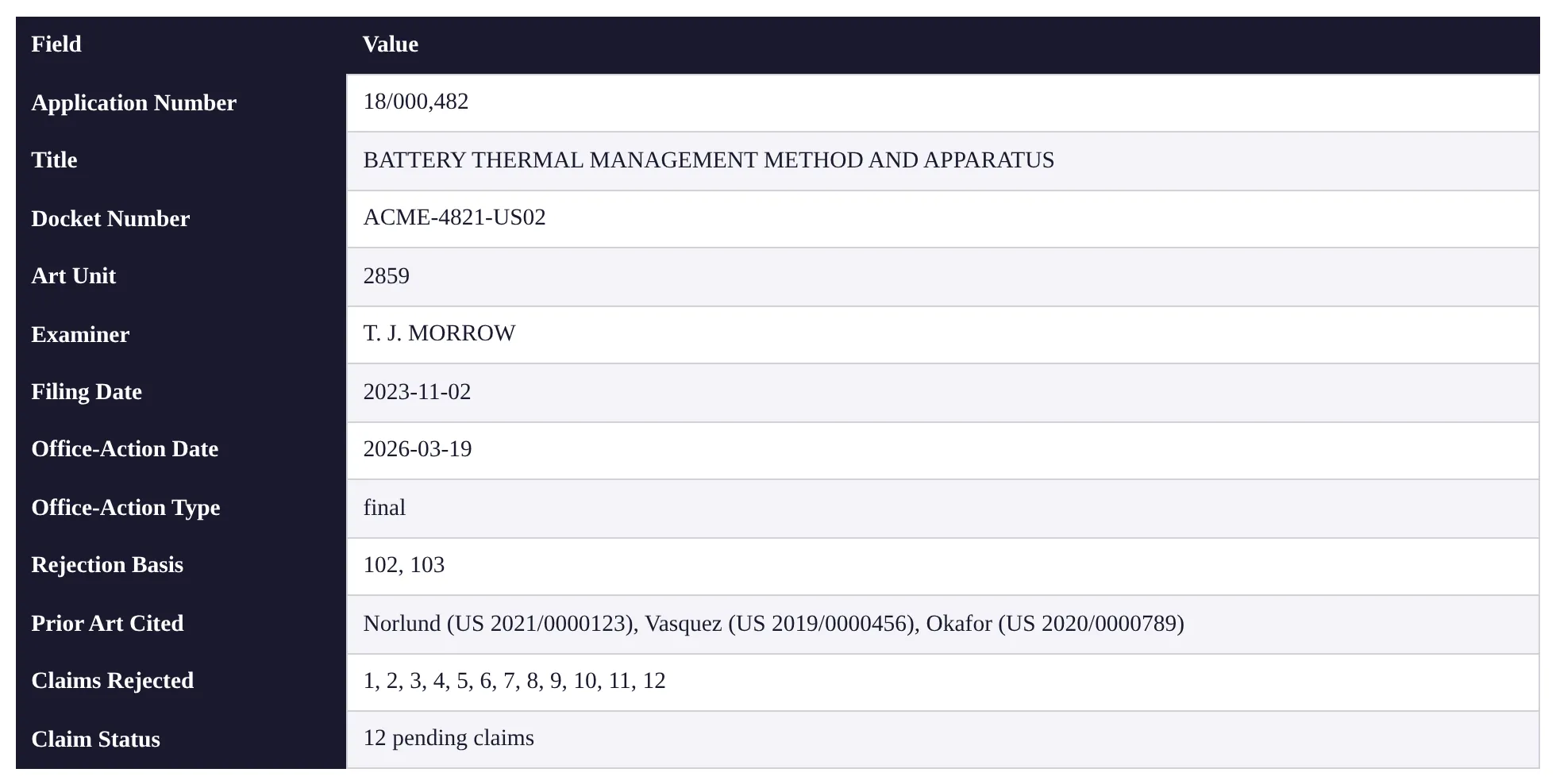
Report header from the sample analysis report: application number, title, docket ACME-4821-US02, art unit, examiner, final office action mailed 2026-03-19, rejection bases, cited references, and claim status — extracted from the uploaded documents
From the sample report — illustrative fictional matter.
02 · PARSE

The office action, parsed.

Application and publication numbers, examiner, art unit, docket, action type and dates — and every rejection block with its grounds, claims, cited references, and the examiner’s relied-on passages. Extracted, not typed.

03 · PENDING CLAIMS

Pending claims, extracted — not retyped.

The best claim source is selected — claims listing, amendment, or draft response — then normalized into numbered claim text with dependencies and active-vs-cancelled status.
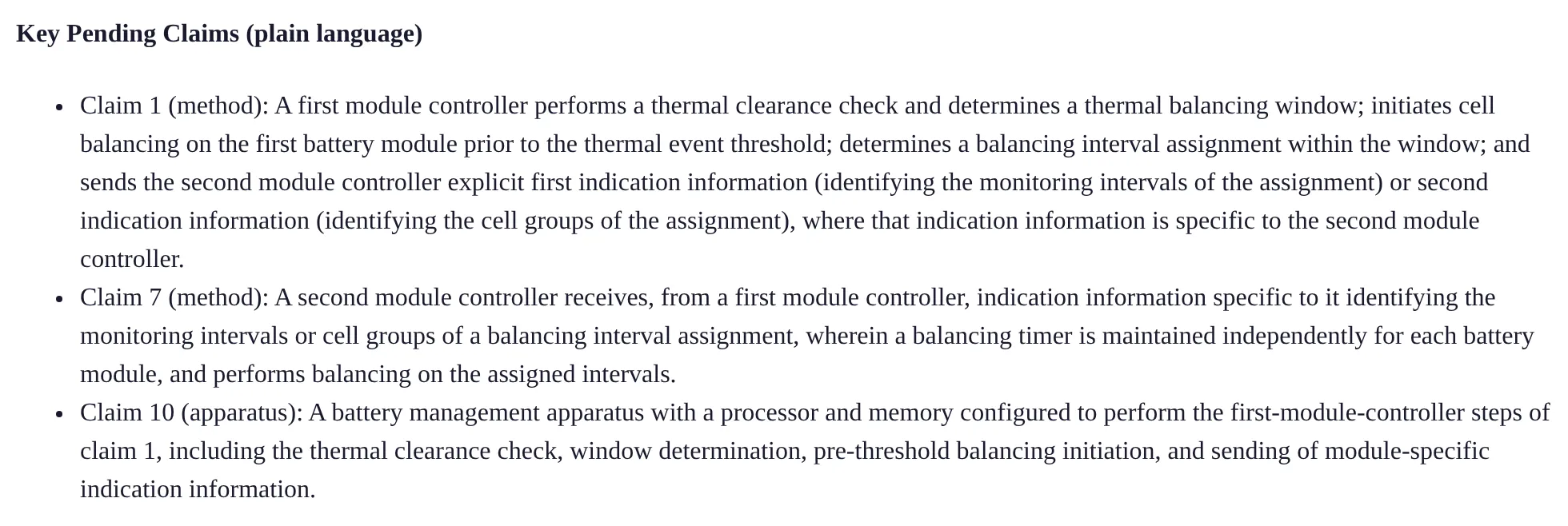
Key pending claims section from the sample report: claims 1, 7, and 10 restated in plain language
From the sample report — illustrative fictional matter.
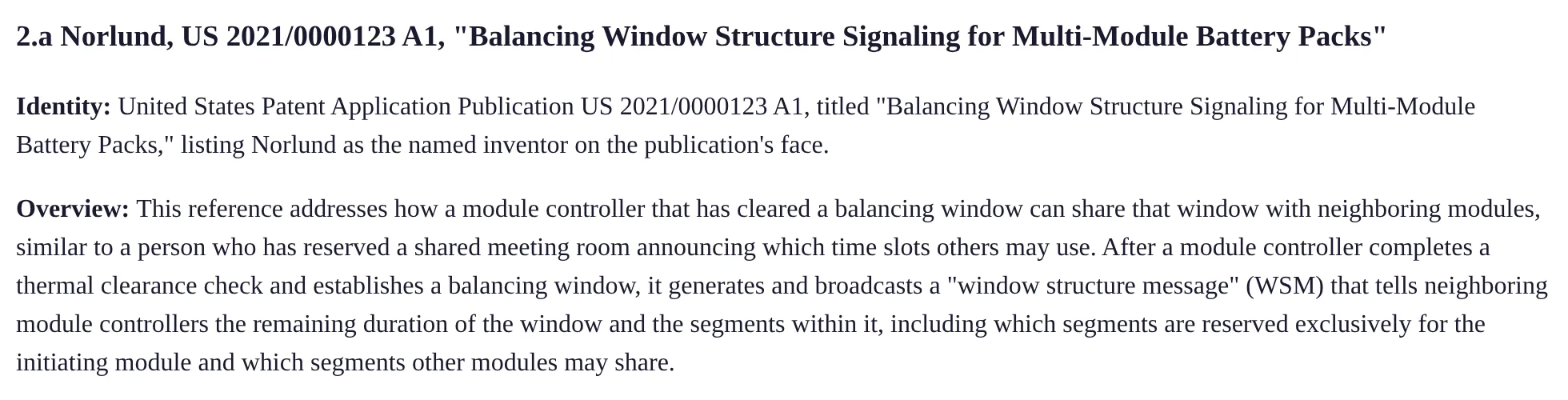
Prior-art summary from the sample report: Norlund, US 2021/0000123, with identity and plain-language overview of what the reference discloses
From the sample report — illustrative fictional matter.
04 · CITED ART

The cited art, summarized against your claims.

Per reference: what it discloses, the passages the examiner relies on, comparison to the pending claims, combination role, key differences. Missing a cited reference? The run stops and asks — or retrieves the cited patent by number.

05 · REJECTION CHART

The rejection chart.

Limitation-level rows: claim number, the limitation quoted word-for-word — checked automatically — the examiner’s mapping, what the reference actually says, a 0–100 strength score, an amendment-candidate flag. Grouped per rejection with overall assessment, weakest and strongest points, and strategy notes.
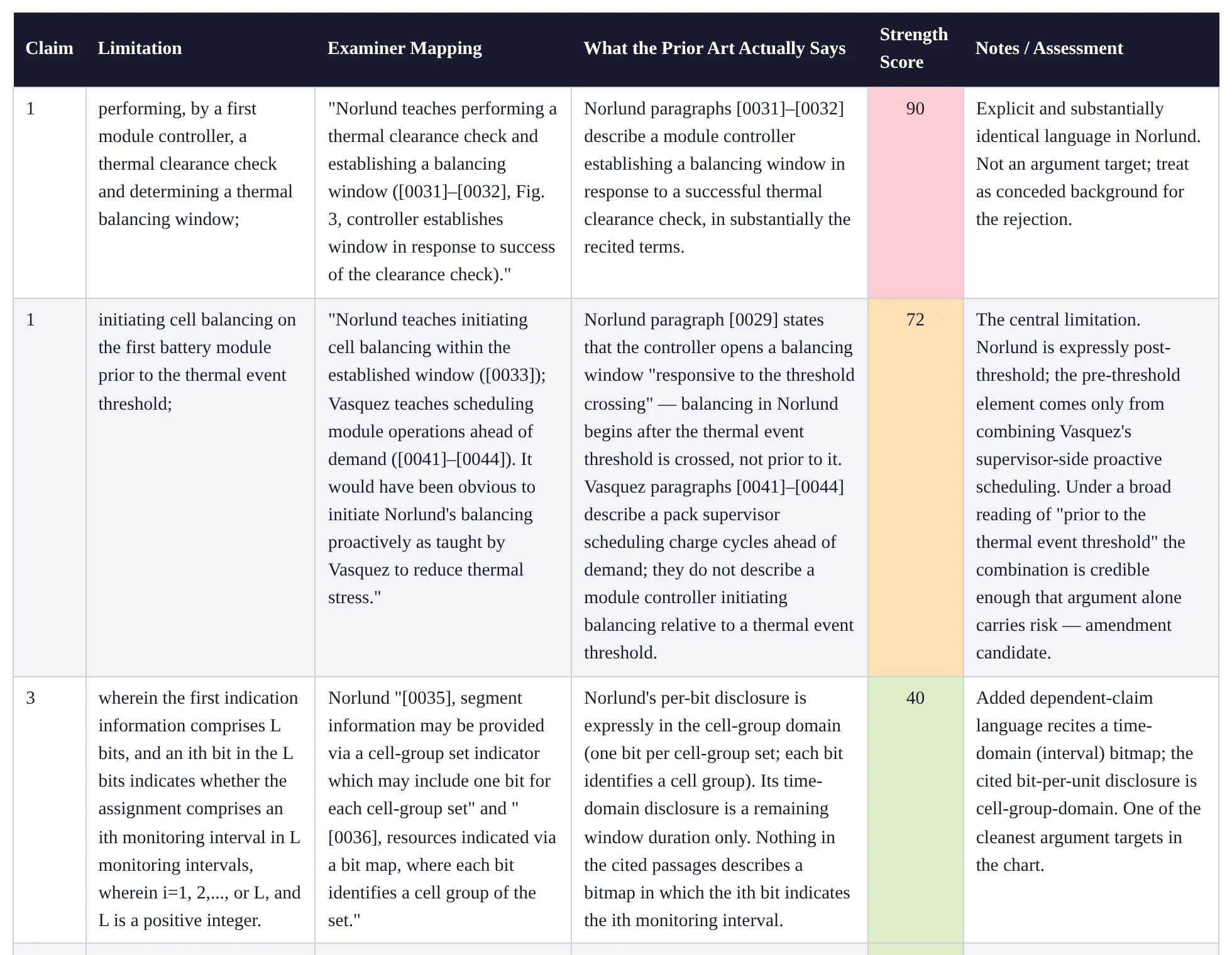
Rejection mapping chart from the sample report: per-limitation rows with the claim language verbatim, the examiner's mapping, what the prior art actually says, and a color-coded 0–100 strength score
From the sample report — illustrative fictional matter.
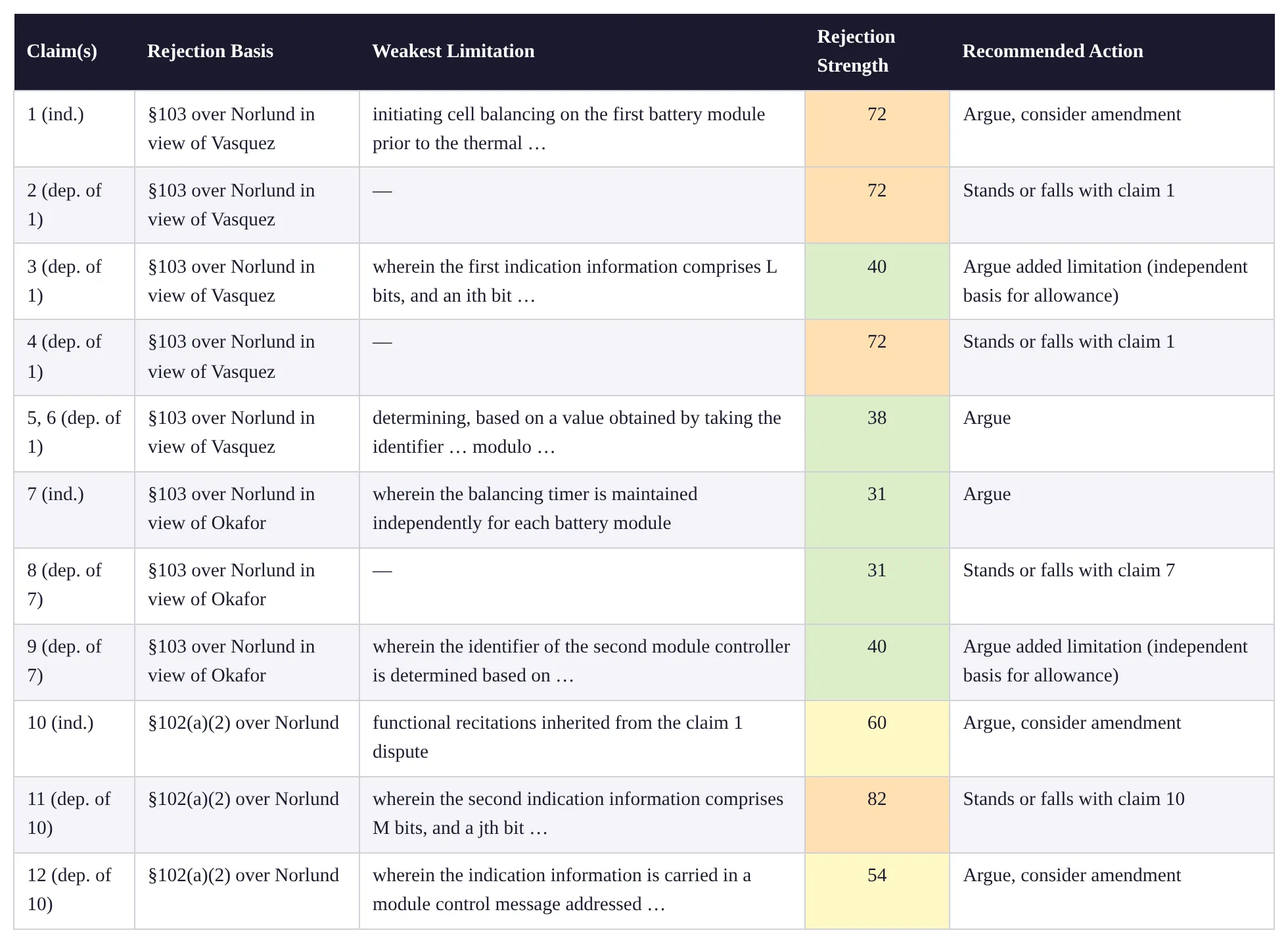
Score summary from the sample report: every pending claim with its rejection basis, weakest limitation, color-coded rejection strength, and a recommended action — argue, argue and consider amendment, or stands or falls with its parent
From the sample report — illustrative fictional matter.
06 · OUTLOOK

What it takes to get each claim allowed.

A per-claim roll-up across all rejections with a recommended action: argue · argue, consider amendment · amend · stands or falls with its parent claim. A dependent claim can never score better than the claim it depends on.

07 · ARGUMENTS & AMENDMENTS

Arguments and amendments, drafted for the record.

Filing-style traversals per rejection (§102, §103, §101); amendment options in prosecution markup with citations to specification support — written under explicit estoppel-avoidance rules, because everything in a response becomes prosecution history.

Amendment option from the sample report: claim 1 in prosecution markup — 'prior to' struck through, 'before expiration of a monitoring interval associated with' inserted, with a citation to specification support
From the sample report — illustrative fictional matter.
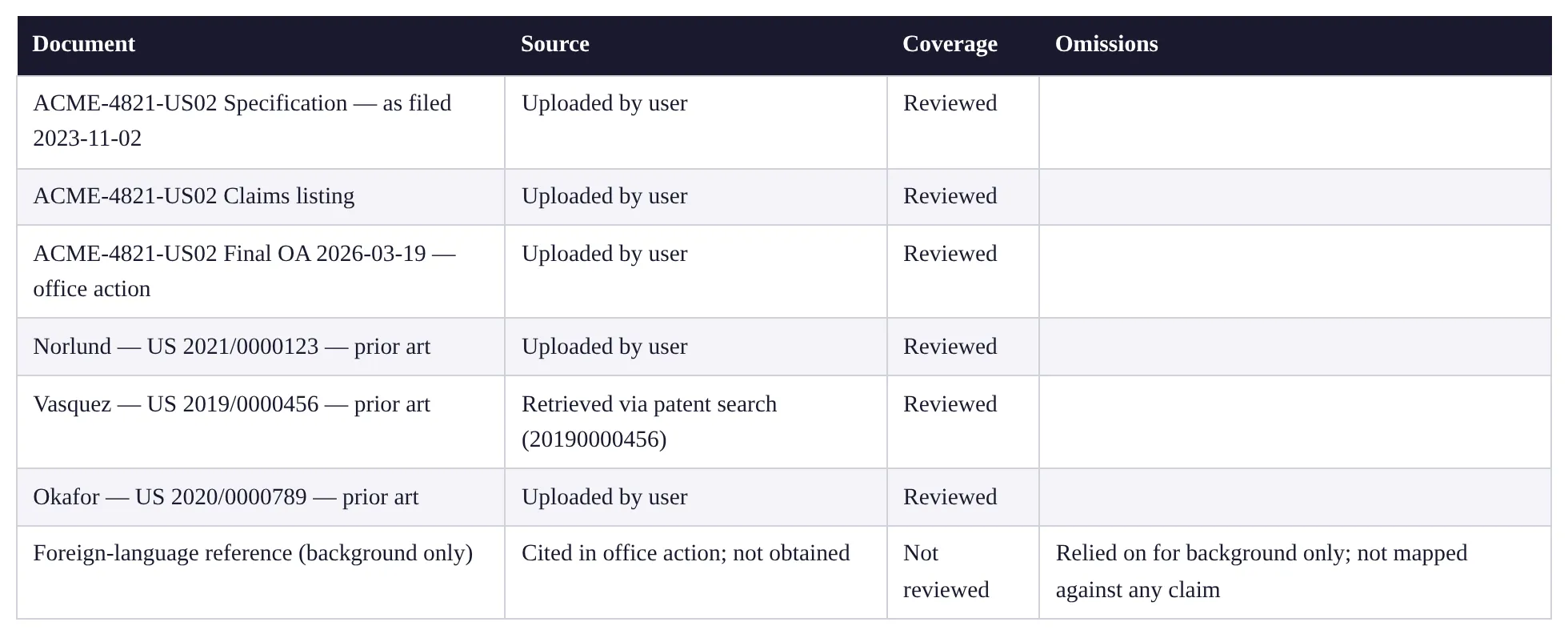
Documents Considered table from the sample report: every source with its origin and coverage — uploaded documents reviewed, one reference retrieved via patent search, and a foreign-language background reference explicitly marked Not reviewed
From the sample report — illustrative fictional matter.
08 · WORK PRODUCT

Work product out, not prose.

A nine-section report in PDF or DOCX (also HTML and Markdown) — and a “Documents Considered” table that flags any cited document the workflow couldn’t obtain.

Read the whole thing.

The complete sample analysis report — every section, chart row, and caveat, exactly as the workflow renders it. Illustrative fictional matter: no real application, examiner, or references.

Read the full sample report →

Why the output holds up

Built to be checked.

Validated at every step

Every drafting step is reviewed by a second, independent check — and re-done until it passes. The chart also goes through an automatic word-for-word comparison that rejects paraphrased claim language.

Your playbook, not a black box

Every step runs on instructions your firm can read and adjust — house conventions, argument ordering, model choices — adjusted only by those your firm grants edit permission, and locked once published, so everyone runs the firm-reviewed version. The word-for-word check and source accounting are built into the system — no edit can remove them.

Customize the judgment, not the guardrails.

Attorney in charge

args.ai produces draft work product for attorney review and signature. It files nothing, advises no client, and every artifact shows its sources. Upload a new document and only the parts it affects are redone — and the report tells you why.

Watch it run a real office action.

Bring one of yours, or use ours.

Book a demo